


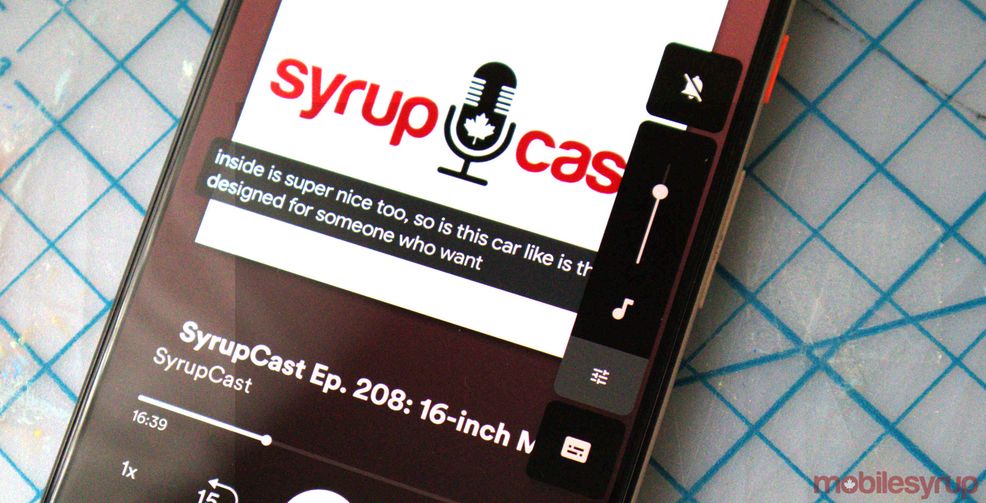
If you use a Pixel 3 or 3a phones then you will now be able to use ‘Live Captions.’
You’ll need to download the latest Android 10 update to enable the feature. Once you do, you’ll be able to toggle on the feature when you’re playing something that supports it.
Live Caption is rolling out to #pixel3 and 3A 📱. Now, more users can caption anything, including videos, podcasts and audio messages without wifi or data. #IDPWD pic.twitter.com/W5T53Y0wRc
— Android (@Android) December 3, 2019
Generally, videos, podcasts and other audio files can be captioned. If the feature is available on your phone you may need to go into Settings and search for Live Captions and make sure it’s enabled.
When the setting is turned on you’ll see a small Live Caption toggle appear below the volume controls when your phone is playing supported media. Tap on it to enable the feature and a subtitle box should appear on-screen. You can tap and drag the box around so it’s in an ideal place for you.
Prior to this update, only the Pixel 4-series supported the feature.
Source: @Android
 News
News  News
News  News
News  News
News 