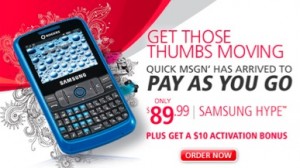
 Remember when prepaid devices were only reserved for the bottom of the barrel outdated handsets? Times have changed as there are many new affordable devices that can be bought on a prepay model that look like they should be purchased on a contract basis. The new Samsung Hype is one to consider. This is available through Rogers Pay As You Go for $89.99 and comes with a decent design and a full QWERTY keyboard that’s perfect for texters.
The good about the Samsung Hype is that it’s lightweight at 87.5 grams so you’ll hardly even know it’s in your pocket. In addition, the style looks like a Smartphone as it has a full QWERTY keyboard with quick access buttons to the web (WAP Browser), camera (VGA, no flash, no auto-focus) and to your games and apps. The Hype has a nice 2.4 inch screen and measures 109 x 59 x 12 mm and has a 880 milliamp battery that will last you for over 5.5 hours of talk time.
MobileSyrup may earn a commission from purchases made via our links, which helps fund the journalism we provide free on our website. These links do not influence our editorial content. Support us here.