


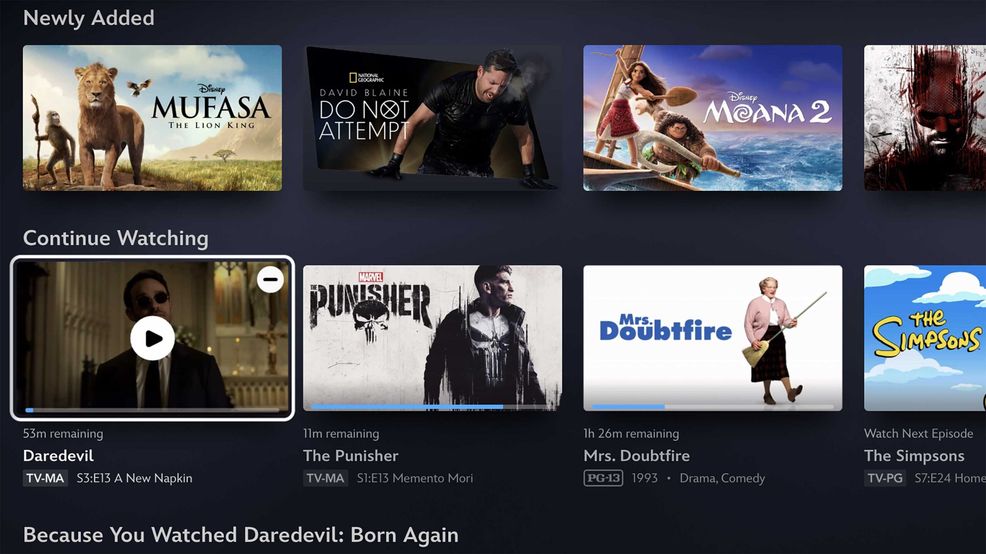
Disney now allows you to remove movies and shows from your ‘Continue Watching’ queue.
On desktop, a little minus icon will appear beside a given title in the Continue Watching row, allowing you to de-list it from there. On mobile, you’ll find three dots on a title card instead. And finally, if you’re on a given title’s ‘Details’ page, you can simply click the new minus icon there.
In a blog post, the company notes that this was a “highly-anticipated” feature, and naturally, there are a few handy use cases for it. Sometimes, you only want to revisit a title for a specific scene, and in other cases, you might have accidentally started playback, leaving it stuck in Continue Watching anyway. Or hell, maybe you’re just like me and have a bit of OCD about this sort of thing, leading you to just want to tidy up that row a bit.
Regardless of use, it’s a welcome addition to Disney+. The feature is currently available on Disney+ on the web, Apple TV and iOS, with additional platform support rolling out in the coming weeks.
Image credit: Disney
 Streaming
  Streaming
  News
News  Streaming