Purported HTC M8 homescreen leaks with onscreen buttons

Daniel Bader

February 6, 2014 7:24pm

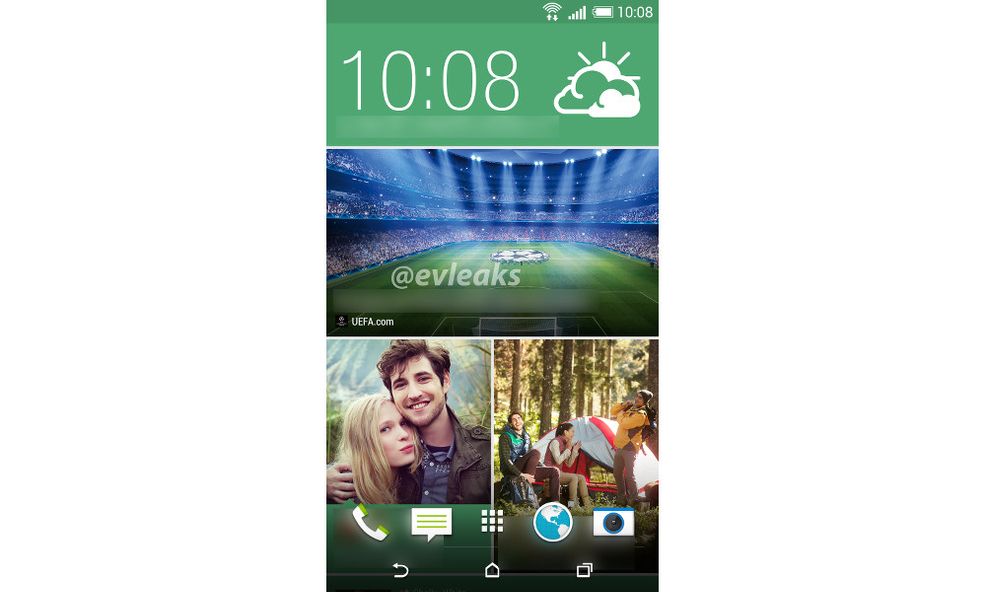
The successor to the nearly year-old HTC One is coming. We know almost everything about it at this point, from its design to its specs. Now, thanks to a new leak from @evleaks, we know what its homescreen will look like.

While the icons on the four-app dock appear to be identical to those found in Sense 5.0 and 5.5, the main difference between last year and this year is the inclusion of onscreen navigation buttons, something HTC long resisted along with Samsung.

It’s clear from the notification bar that the HTC M8 will ship with KitKat — the One received it just last week, so that’s a given — but a new version of BlinkFeed, perhaps configured as a live wallpaper, looks possible as well.

HTC appears to be content furthering Sense’s evolution of flat design, though I’m not sure I’m enamoured with the halo around the dock icons. Hopefully that’s not a permanent inclusion. It’s also a little bit disappointing that HTC has not replaced its stock browser with Google’s own Chrome browser, which Motorola and Sony have chosen to do.

Nevertheless, we’re extremely excited to see what HTC has in store for us this year, especially because the One was such a great phone held back by a few nagging defects.

htc-m8-home-551x980

Source@evleaks

  • ITCanWork

    Everyone has to admit, Microsoft was a visionary coming out with dynamic “tiles” as an OS interface. Look at the HTC and Samsung examples coming out.

    • userofAndroid

      The WP tiles are completely different than blinkfeed. Not sure how MS was visionary in that wondering there were widgets on android before WP tiles.

    • Toron James

      Widgets are not Tiles if they were then Microsoft’s Live Tiled homescreen would not been seen as innovative and different when it first appeared.

      Tiles takes up your whole screen or the majority of it and displays more information in a elegant yet productive way.

      Microsoft had Widgets before Android, Windows Vista was the first operating system to have Widgets, look it up.
      Give credit where its due for Christ’s sake and move on, its clear that it Blinkfeed imitates WP Tiles, even Stevie wonder can see that.

    • Toron James

      Widgets are not Tiles if they were then Microsoft’s Live Tiled homescreen would not been seen as innovative and different when it first appeared.

      Tiles takes up your whole screen or the majority of it and displays more information in a elegant yet productive way.

      Microsoft had Widgets before Android, Windows Vista was the first operating system to have Widgets, look it up.
      Give credit where its due for Christ’s sake and move on, its clear that it Blinkfeed imitates WP Tiles, even Stevie wonder can see that.

    • formulaphone

      “Windows Vista was the first operating system to have Widgets”

      Sir your mistaken. Mac OSX had widgets long before vista. Look it up.
      …Toron

    • Supa_Fly

      Actually you’re BOTH WRONG! Mac OS 4 had widgets before anyone on any platform.

    • alexxx

      Widgets and tiles are very much alike although I prefer widgets (its like apples and oranges due to OS, and yea blinkfeed is not yet as integrated as Metro); Widgets are much more customizable, my clock alone has 130 skins! not to mention all the display and sub theme effects, JUST THE CLOCK. I’m a bit ocd’d.

    • alexxx

      I agree with you completely, great observation. I think of it as a dynamic file system on top of the main one, at least in Windows 8. It zooms out to give a broader perspective, just the way to go.

    • Supa_Fly

      Honestly, I think FlipBoard debuted on iOS long before WP was around and THIS is what blinkfeed and Samsungs’ new UI over Android are trying to mimic.

  • Super_Deluxe

    hopefully those buttons can be rearranged to the user’s liking. Im used to the back button being on the right and the menu button being on the left. I know I can get used to it but since most phones are setup like that, I’d prefer not to change my habit.

    • Sam Wiggans

      Most devices are like the one shown, including nexus devices, Samsung is the one putting the back button on the right ..

    • Super_Deluxe

      Yeah I know my first Android phone was the S3 and now I have the LG G2 and it also has the menu button on the right and the back button on the left but thankfully LG added the option to place the buttons in any order you want and they also added a fourth button to the mix that opens the notifications bar instead of reaching at the top of the screen for it all the time. If HTC atleast adds the option to switch the back and menu buttons around, that would be great. I know its not a huge deal but its a minor pet peeve of mine lol.

    • Lirodon

      The LG G2 does buttons wrong.

      The menu button is supposed to be deprecated. HTC is doing it right, though I think the Back/Home only thing was pushing it a little…

      My current phone is a Nexus so I’m used to this

    • Bri

      I hated the way HTC did their buttons for HTC One. Multi-functional buttons are not user-friendly. The same goes to Samsung’s home button.

    • Bri

      I agree. I think the fourth button is a great idea especially for devices with a large screen.

    • Super_Deluxe

      Yeah I know my first Android phone was the S3 and now I have the LG G2 and it also has the menu button on the right and the back button on the left but thankfully LG added the option to place the buttons in any order you want and they also added a fourth button to the mix that opens the notifications bar instead of reaching at the top of the screen for it all the time. If HTC atleast adds the option to switch the back and menu buttons around, that would be great. I know its not a huge deal but its a minor pet peeve of mine lol.

  • Henry

    I for one think the Sense 5 browser is much better than Chrome. Dolphin is likely the best of them all.

  • Henry

    I for one think the Sense 5 browser is much better than Chrome. Dolphin is likely the best of them all.

  • wes

    looks nice.

  • wes

    looks nice.

  • Rich

    I’ll admit it looks nice, but realistically how many different types of launchers and alike do we have available to us? Wouldn’t attention be better spent elsewhere…

    • Lirodon

      The buttons, given that it uses the KitKat transparency API, will hopefully look like that on all launchers. That would look interesting with Nova or Google Now Launcher

  • Lucas Kitchen

    Hey team, not sure where else to post this but has anyone else been experiencing battery issues with their HTC One after the kit kat update?

    • Bri Bru

      I think Mobilesyrup should bring the forum back for the users!

  • Garrett Cooper

    Looking forward to this phone. Was planning on upgrading from my N4 till I broke the screen last weekend and picked up a Sony ZL. Can’t wait for this thing to come out!

  • Hungrier

    Looks like they brought back the data transfer indicators on the status bar. I only wish Google would bring them back in stock Android. Removing them in KitKat was a bone-headed decision.

  • Abdul B

    Htc is our true savior in this era of ugly galaxies and boring apples. All who oppose htc will be destroyed.

  • Mika Turcotte-Talbot

    nooo I hate onscreen buttons :(