


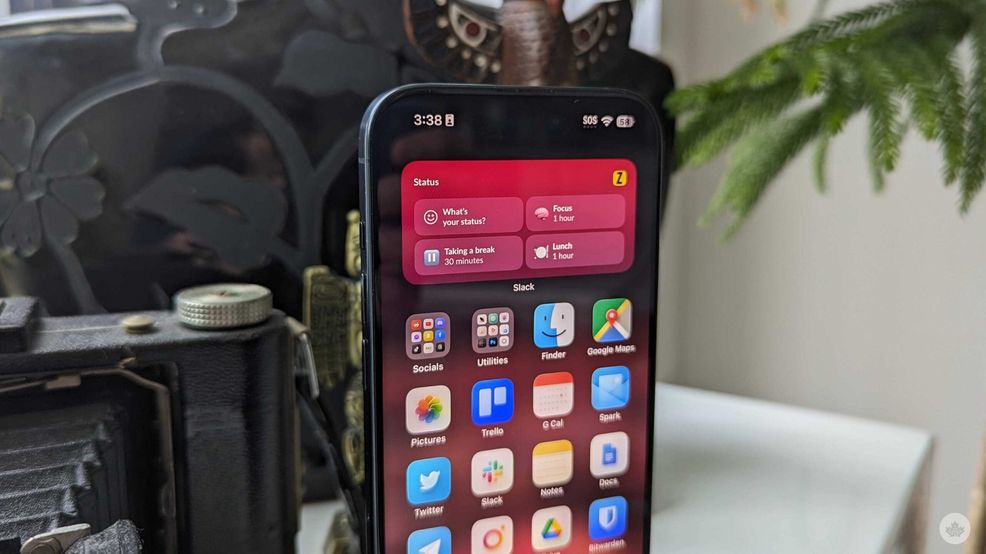
If you’re a big Slack user, you’ll be happy to know three new widgets on iOS can help you catch up on messages or set your status.
The first two are small 2×2 square options. The first allows you to catch up on your unread messages. The second lets you jump into the app to the ‘Set a Status’ page.
The third is the larger 2×4 rectangle, and it allows you to choose from four pre-set status options. One lets you set a status like before, but the other three options are ‘one-hour focus,’ ‘ 30-minute break,’ and ‘one-hour lunch.’
Three 3⃣new Slack iOS widgets are here to make your workday a whole lot easier. ?
Add the Catch Up widget, Status widget, and Slack Launcher widget to your device and stay in the know on the go. pic.twitter.com/bEak0coGZK
— Slack (@SlackHQ) July 22, 2024
If you tap-and-hold on the widget, you can bring up the option to assign it to one workspace. Unfortunately, if you have multiple workspaces, you’ll need multiple widgets. However, you can group them in an iOS Smart Stack, which might help a little. On that note, ideally, if you use this around the same time every day to set a lunch status, iOS should be smart enough to surface the widget when you need it.
The widget was announced on Twitter, and the company replied that an Android version was on its roadmap.
Source: Slack
 News
News  News
News  News
News  Gaming