


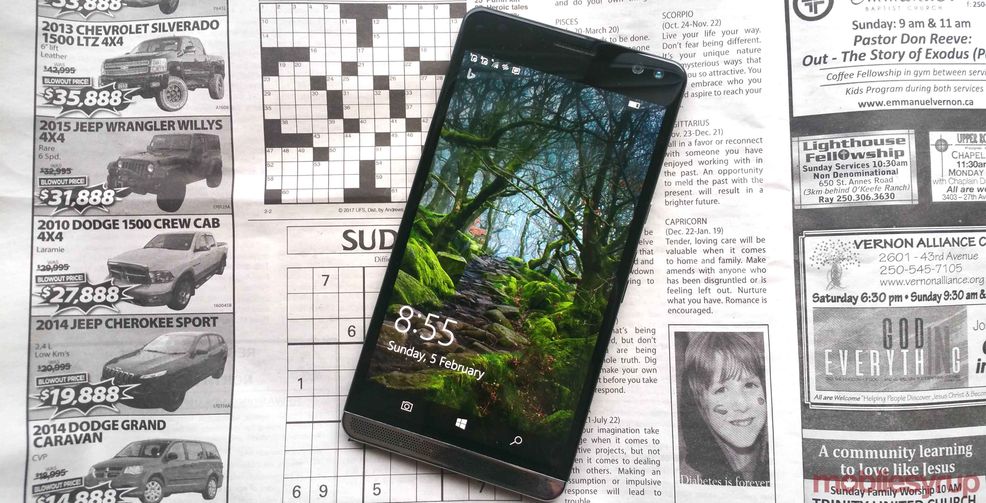
These days it’s hard not to feel a sense of doom and gloom surrounding Windows 10 Mobile.
A series of major services have withdrawn their apps from the platform in the last few weeks and even Microsoft appears to have admitted that the operating system is more trouble than it’s worth by dropping support for the Windows Mobile version of Minecraft.
With that in mind, I admit that I felt a pang of regret that Windows isn’t a viable option as my everyday mobile OS when I tested Hewlett Packard’s Elite X3. As a premium phone that deserves to stand alongside the likes of the iPhone 7 and Google Pixel, the Elite X3 is a phablet fan’s delight. Yet, the reality is that very few people are likely to experience it because of the operating system it runs on.
Productivity focus

Microsoft has been trying to position Windows 10 Mobile as the best choice for productivity-oriented users and the Elite X3 is squarely aimed at that market. With an OS that matches HP’s ambitions, the Elite X3 could be the ideal phone for anyone who frequently flies business class. The 5.96-inch WQHD AMOLED screen is massive and brilliantly sharp, which makes manipulating Excel spreadsheets and writing Word documents on-the-go easier than it is on probably any other phone on the market (and the screen is great for watching HD movies on, too). Then, at the office, there is the option to kick into Continuum if the additional hardware is available.
Under Continuum the phone’s Start screen becomes the Start Menu and UWP apps are scaled appropriately for a computer monitor. The Elite X3, with its Qualcomm Snapdragon 820 2.15 GHz processor and 4GB of SDRAM, handles Continuum without a problem.

Furthermore, with the specially-designed Desk Dock, which comes in the $999 CAD bundle currently advertised on Microsoft’s Canadian store, you can hard wire the phone to a monitor via HDMI and to the web through Gigabit Ethernet as well attach USB-A (x 2) and USB-C (x 1) devices such as printers and external hard drives.
HP is understandably trying to get across these advantages by promoting the Elite X3 as a phone that gives a PC-like experience. Unfortunately, because of software limitations, the reality doesn’t match up with the marketing. There are still too few UWP apps and too many constraints on multitasking under Continuum to give a phone connected to a monitor the power and versatility of a PC regardless of how convenient the display scaling is.
Windows 10 mobile’s limitations

Continuum is a nice bonus if you’re travelling between offices and need to write e-mails, run off a report or make edits to a presentation without wanting to lug a laptop around. If you need more than that, though, Continuum isn’t going to cut it.
As a productivity tool, therefore, the Elite X3 is let down by the current capabilities of its OS. Inevitably, that also applies to everyday use. There is a lot I like about Windows 10 Mobile: it’s fast, familiar and visually different from its more successful competitors. Even so, it feels like a neglected platform. The lack of apps is well-publicized and you can’t even stream to a Chromecast without feeling like you’re fudging it. Moreover, too many services can now only be accessed through a web browser, which is never as convenient as using a dedicated app, even on the Elite X3’s large screen.
None of Windows 10 Mobile’s limitations should distract from the merits of the Elite X3’s hardware, though. You certainly get your money’s worth in mass because the Elite X3 is a giant. Hewlett Packard gives the phone’s length and width as 161.35mm x 83.57mm.

That’s 3 mm longer and over 5mm wider than the iPhone 7 Plus and bigger still than a Pixel XL. It is also 0.6 mm thicker than both of these phones. With those dimensions, the Elite X3 is a phone that only The Incredible Hulk will be able to operate with one hand. Still, the weight is comfortable and the matt metal back doesn’t feel slippery.
 Gaming
  Reviews
  Reviews
  Reviews