
We’ve been using the Palm Pre for the past week or so and love the multi-tasking ability and even love flicking away the applications when I’m finished with them – kinda a power trip against me and the Pre. With that said… have you registered for our Palm Pre giveaway yet? Put your name in to win here!
Palm created the Pre from the ground up and from what we hear this is the first of many devices to sport their new webOS platform. It’s very intuitive and simple to use. Apart from looking good, the Pre also has something called “Palm Synergy”. Basically this joins all your Microsoft Outlook, Google and Facebook calendars and contacts together.
It’s actually a great idea for those who have and use all those services. Pretty pointless if you don’t use Facebook or Google though. I can see it being very beneficial for your Outlook and syncing your work contacts here. But let’s say you hook up your Facebook, depending on how many “friends” you have will determine how long the syncing will take. For me there is about 300 plus friends and took less than a minute. However, now scrolling through my contacts I realize that some of my so-called Facebook friends are now in my contacts. The downside is that I cannot remember speaking or connecting with some of them over the past 10 years. I just became “friends” on Facebook, not in my day-to-day life. When I went to try to delete a Facebook contact I got a message that “Facebook profiles cannot be deleted”. Hopefully I’ll find a way to organize (delete) this correctly.
What’s good about the contacts is that I can use the Universal Search to quickly locate the person/group I want. This will save me a bit of time rather than scrolling through the massive sea of people.
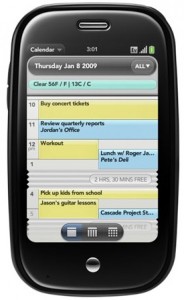
The Calendar does an incredible job of displaying my appointments and syncing. In the video we show how quick it updates when a new appointment is set, basically automatically. Also, Palm makes sure that your day can be viewed at one glance and created this “crunching” aspect for your free time (shows how many minutes and hours you have available until your next appointment). In addition, this pulls info from the web from your Outlook, Facebook and Google calendars and can be colour co-ordinated so you can keep track between personal and professional.
For your e-mails, this renders full HTML e-mails and uses the entire 3.1 inch screen. Simple to use and simple to set up. Along with the contacts and calendar, the e-mail can also be set-up to get your Outlook, Gmail and any other e-mail accounts you have. Pretty standard but typing on the Pre will need some getting used to. Since the keyboard is similar to the Centro or Treo Pro you’ll find the keypad really close together and the keys rubbery. It will be a bit of a challenge for those with bigger fingers/thumbs as you’ll literally have to work your way through the keyboard letter by letter, number by number.
Depending on how many accounts you have set up, the Pre does a bang up job at separating them in the e-mail menu section. It lets you know how many messages you have in total for each account and then combines the total messages also. In addition, when a new e-mail comes in (similar to the calendar) a notification shows at the bottom with the sender, time and header info. If you want to read the e-mail simply tap on the notification, or to remove simply swipe it away to the right.
Check the video out here:
It seems strange that this phone has gotten way more posts and reviews on it then any other device that you have reviewed, including the iPhone…
Like or Dislike:
0
0
That’s because it is so much better then the iPhone!
Like or Dislike:
0
0
Been a Palm user for a long time. Palm Pilot, Palm 100, had just about all of them. Upgraded from the Treo 700P to the Pre.
I love the new features. Multiple apps at once: good. Wipe the screen to switch or close apps: good. Zoom in and out on webpages, emails, and most all pages: great.
But WHY the heck did they REMOVE functionality?? Now, I realize that Palm isn’t the same Palm as 10 years ago. The company/OS has been been sold what, twice? Three times? But anyway, why would they take out something that was in a previous version? Here’s my beefs with the Pre:
Search functionality. Yeah, I can search contacts, memos, and tasks, by just starting to type a word in each one. But before, when I used the search function, it searched everything at once. Now I have to do it separately in Tasks, Contacts, and Notes. AND WHAT ABOUT MY CALENDAR?! I have years worth of data in my calendar – transferred from Palm to Palm. Hey, when did I buy and start using something (like my last Palm)? THERE IS NO SEARCH FUNCTION IN THE CALENDAR!!
Sync feature: now done automatically over the web. Scary. Don’t have the option to save on my PC too. And not everything is backed up! Any files, photos, and such that I bring over via USB aren’t backed up. WHY NOT? Is there any other computer this day and age that you can’t back up ALL the data?
Previous apps don’t run. I know, it’s a new OS, and there’s Classic, from MotionApps, the $29.95 app that says it runs PalmOS apps. Well, it doesn’t, at least, none of the ones I had, except the built in apps on the Treo. They either crap out, or have limited functionality, can’t read things on the screen, buttons don’t work, etc. All of them say they’re “not Classic certified.” That means they don’t run, or don’t run right.
Hidden data:
I have a very sensitive job. Very sensitive. There are contacts that shouldn’t be visible to another user, if I hand them my phone for something. Also notes, memos, other data. With the Treo, I just hit a button, and I have the option to hide that particular piece of information, password protected. Even though not visible without unlocking, the data is still backed up to the PC (remember backing up to the PC)? But now, everything is out there for anybody to see.
Memos. I have lots and lots of memos. It’s where I store bits of information that I might find useful some time, but not look at for years, maybe. Now, imagine a room, with filing cabinets filling the room, each with 4 drawers, each drawer with multiple folders, each folder containing one to many bits of related information.
Well, one layer of that has been taken away with the Pre. It’s like having a single drawer, WAY long, with lots and lots of folders held sequentially in it. I can move them around, but I can’t put the folders into different categories (or drawers), except for the silly colors the Pre allows to use for a background. That’s like having hundreds of folders, in only 4 different colors, still all in the same drawer. MUCH harder to organize into anything useful.
Ring Tones: On the Treo, I had one ring tone for people in my contact list. Another for calls from numbers that are not in my database. A few special ones tied to a few special people. Not with the Pre. Again, less functionality. One ring tone for every incoming call, known or unknown caller, and then the same specifically assigned ones. Once again, they took out a level of functionality. WHY??
Now the hardware. Smaller, narrower, thinner than the Treo. Actually a little hard for my thick hand to hold. Extremely tiny keyboard, also harder and slower to type on than the Treo. I got pretty fast at typing on the Treo. Makes my hands hurt on the Pre.
Battery life. WHAT battery life? My Treo lasted all day, sometimes 2-3 days if I didn’t use it much. The Pre just sucks that thing down, especially using the Web much, such as e-mail and the browser. Phone calls too. Pretty hard to get one full business day out of it without recharging some. HAVE to carry the USB cord for emergency charging, just in case. Can’t just carry a spare battery, nope, they removed that functionality too! Built in, can’t just open a door and pop in a spare like on the Treo.
Are you listening Palm???
Like or Dislike:
0
0
“I have a very sensitive job. Very sensitive. There are contacts that shouldn’t be visible to another user”
J-M – I’m assuming either you’re in the CIA or have lots of Porn on your phone.
Like or Dislike:
0
0
Thanks HRPufnstuf, for an excellent summary of the Pre’s shortcomings. The inability to search the calendar was a show-stopper for me. I couldn’t use the Pre for business purposes because I frequently need to find “when is the last time I met with this person?”
This problem was serious enough to cause me to return my Pre. Two other features are missing: Shortcuts and the Expense application. I hope Palm is working on a solution. If they are successful, I’ll return as a customer. Otherwise, my next smartphone will likely be a Blackberry.
Like or Dislike:
0
0
To J-M:
CIA: no. Law Enforcement: yes.
I don’t do porn. That’s like looking at a picture of food when you’re hungry.
Like or Dislike:
0
0
I noticed in your video on you tube about the calender, that you had Canadian Holiday’s on there. how do I get them on my Pre? and can you change the look on the monthly screen to show the colours for the calender that they are attatched to? Thank’s!!! BTW… Excellent review! Your reviews are what made me purchase my Pre last week and I love it!!!
Like or Dislike:
0
0

