
Follow Us:
6

Bell Palm Pre Review #3: Battery Life and Touchstone

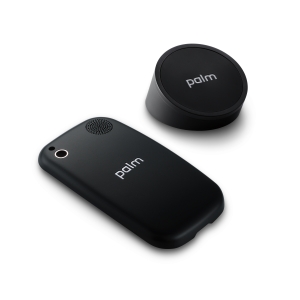
Palm TouchstoneThe Palm Pre is fun. Easily switching between applications has gotten a bit more exciting! You can tell Palm has thought about how the user would actually want to interact and experience a device. Switching back and forth between an iPhone and a Pre, I found myself doing the “gesture area” action of the Pre with the home button area of the iPhone.

Depending on how many applications you have running at the same time will be an indicator of how long your battery life will be. I’ve been using this for the past few days getting my e-mail, calendar, messaging, surfing the web, using the camera, sharing my photos, using Google Maps, getting/using apps, watching YouTube videos… and it drains a great deal faster than similar devices we’ve reviewed. I had to remember that the Pre uses the web to continually do real-time updates. With using all these applications it just gets me through a full day of use.

To help you get the most out of your battery you can change the settings of your e-mail to check every 5-10 minutes rather than every minute. Even your IM settings, change it to Busy or Offline when your not available. To charge the Pre you can use the microUSB that’s given to you when you buy it. Or you can get the Palm Touchstone. An accessory that uses “inductive technology” that somehow charges your Pre wirelessly. I don’t know how this works as I’m not a science guy, but all I now is that it works well.

The Touchstone has a sticky bottom to which Palm also designed from scratch. They mimicked the feet of a Gecco and how it can climb anywhere. The same is with the Touchstone as this can literally be placed anywhere and keep it’s position.

Once it’s plugged into the wall you put the microUSD into the Touchstone. You’ll also get a new backing for the Pre, one that has a matte feel and look to it. You’ll see there are magnets inside the new backing that make it possible for the Pre and the Touchstone to essentially speak to each other. By placing your Pre on the Touchstone (Palm logo to Palm logo) you activate the charging to start. This can be done in portrait or landscape mode and still give you the ability to use the Pre and all it features.

The Touchstone basically saves you a step in the “charging your device” process. You only will need to plug it in once and then charge and go. This will help you keep your battery at full power. But ease and convenience will have a price to it… this accessory will cost you a bit more money – from what we hear Bell is going to retail this for $79.95.

Check it out here in the video:

Related posts:

Discussion

6 comments for “Bell Palm Pre Review #3: Battery Life and Touchstone”

  1. There is no need to fetch email continuously. One trick I have used forever on other devices works like this: I forward my Gmail to my cell number and everything appears (well, the first 140 characters or so) as sms in real time. You could call this the poor man's push email service. I find that most of the time the text I get is sufficient and I don't have to get the full length email which is still sitting in my Gmail in-box anyway.

    It doesn't cost anything extra as long as you have an unlimited received text plan. This is much easier on the battery.

    Spare Palm batteries are available on FleaBay for $11. Pay more and you get a same size as original battery with about 30% more power. They also have other batteries a bit thicker, with twice the original capacity and even more than three times the original capacity.

    Try that with an iPhone;-)

    Like or Dislike: Thumb up 0 Thumb down 0

    Posted by toyandme | August 23, 2009, 11:22 am
  2. Further to my previous post….

    - In regards to the cost…

    Might it not be cheaper just to buy extra batteries & charger via the USA?

    A 1400mahr battery is $50, works with the touchstone, lasts longer than the standard 1100+ battery and you can still buy the touchstone w/back for much less too.

    The touchstone is $40 or $50 with the back.

    So for about ~$110 incl. shipping (~$120 Cdn), I can get an extra battery with more life and the touchstone with a back to my door. Or I can just pay the ~$85 dollars to my local Bestbuy or Bell store right here in Canada to get the overpriced touchstone & back.

    Like or Dislike: Thumb up 0 Thumb down 0

    Posted by Clint | August 23, 2009, 12:04 pm
  3. thanks for the info…

    Like or Dislike: Thumb up 0 Thumb down 0

    Posted by J-M | August 23, 2009, 8:05 pm
  4. Where is the email,sms,mms,review that is what people what to see! Please I have to know if bell messed this phone up to.

    Like or Dislike: Thumb up 0 Thumb down 0

    Posted by sean | August 25, 2009, 5:01 pm
  5. i have a question . hope some one can answer can i chat on msn that like with the htc diamond or u can do the same as the iphone with ebuddy.com ? or how that does it work.. im getting this celphone tomorrow and i dunno if i can unse hotmail. or so! thanks

    Like or Dislike: Thumb up 0 Thumb down 0

    Posted by girard | August 26, 2009, 1:35 am
  6. I recently bought the Palm Pre (Bell) just over a month ago. I must say – I LOVE THIS PHONE!!!!!

    A girl from a local Bell store tried to steer me off this phone entirely (she even used the “I wouldn’t let my friends buy it” threat). I researched my butt off and aside from the odd negative comment about it rebooting and the horrible battery life – the palm pre came home with me 2 days later.

    I LOVE IT! Yes the battery life is OK (I’d give it a 7/10), but it’s a smart phone, it uses a bit more juice and power than your average flip phone.

    One thing I can recommend doing if you have it on a regular phone plan (ie: not a data plan). DISABLE YOUR 3G INTERNET! I’ve been using the WiFi only to find a $30 internet charge on my phone bill. Turns out, if WiFi cuts out, it uses the 3G which is what you are charged for. If you disable that, it will disconnect entirely if the WiFi signal is out of range.

    As long as you are within a WiFi zone, you can browse the net, log into Ebuddy etc…

    This phone is smooth, sleek, VERY easy to text on. The touch response on the screen is amazing (c’mon, closing an application by flicking it to the top of the screen – it’s badass)!!!!

    I would highly recommend this for anyone who cannot afford an iPhone or Crackberry.

    The ONLY other gripe I have, is the tightness of charging the phone – the charger that plugs in is very tough to get into the phone and I’ve noticed with a bit more force it warps the pixels (they don’t stay that way). So I would recommend purchasing the TOUCHSTONE charger!

    Like or Dislike: Thumb up 0 Thumb down 0

    Posted by Lauren | May 24, 2011, 10:51 am

Post a comment

