Follow Us:
43

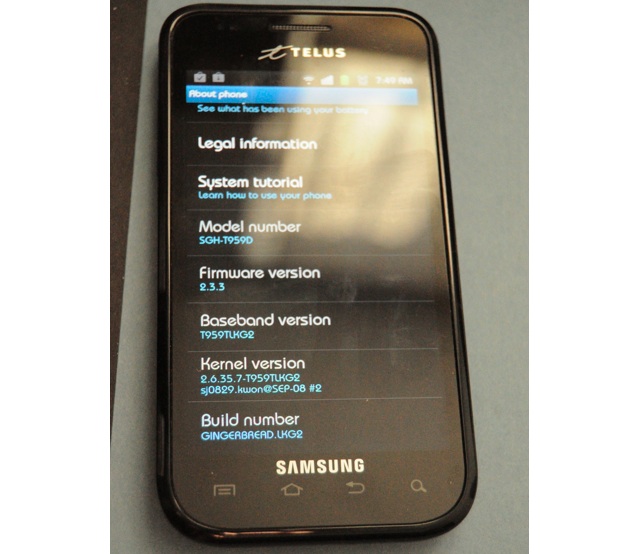
TELUS Samsung Galaxy S Fascinate 3G+ upgrade to OS 2.3.3 now available


It’s a great start of the day for TELUS Samsung Galaxy S Fascinate 3G+ users. When this Android device launched in November of 2010 is had OS 2.1, then was quickly updated to OS 2.2 Froyo… but now, your upgrade to Android OS 2.3.3 Gingerbread is officially available to download.

Get all the details here at TELUS
(Thanks Dave for the pic!)
Discussion

43 comments for “TELUS Samsung Galaxy S Fascinate 3G+ upgrade to OS 2.3.3 now available”

  1. Siicckk….. Tobad ive been tryingbto get it to work since last night!!!!!

    Like or Dislike: Thumb up 0 Thumb down 1

    Posted by Stephie | August 19, 2011, 8:24 am
  2. Are you serious? What about Rogers Captivate?

    Like or Dislike: Thumb up 2 Thumb down 2

    Posted by Andy | August 19, 2011, 8:27 am
  3. Yeah come on Rogers – time to update the Captivate!

    Like or Dislike: Thumb up 3 Thumb down 1

    Posted by Sasha | August 19, 2011, 8:35 am
  4. My Nexus at 2.3.4 for months now.

    Like or Dislike: Thumb up 4 Thumb down 8

    Posted by Dave | August 19, 2011, 8:40 am
  5. It’ll be interesting to see if this version is also plagued with the infamous battery drain issue!

    Like or Dislike: Thumb up 3 Thumb down 3

    Posted by David | August 19, 2011, 8:49 am
  6. Not available for the 4G? WTF

    Like or Dislike: Thumb up 11 Thumb down 1

    Posted by Slowpoke Rodriguez | August 19, 2011, 9:09 am
    • it is happening in about 1 month or less according to my contacts

      Like or Dislike: Thumb up 1 Thumb down 1

      Posted by Shamu | August 19, 2011, 10:09 am
  7. Yup. a great way to start the day! also whats with the mobilesyrup site change… cant find the forums on my fascinate 3g…

    Like or Dislike: Thumb up 0 Thumb down 1

    Posted by brandon atkinson | August 19, 2011, 9:43 am
  8. Samsung is really good at updates – my customers are still waiting for the updates to the LG phones I sold them ..zzzz … I think they might be waiting a loooooong time..!!

    Like or Dislike: Thumb up 2 Thumb down 0

    Posted by Shamu | August 19, 2011, 10:10 am
  9. It just says this version of the device can not be updated? What do I do?

    Like or Dislike: Thumb up 0 Thumb down 0

    Posted by philly | August 19, 2011, 10:24 am
  10. Im Having tons of trouble with this update. dont bother calling Samsung, they just tell me the update isnt available yet, even though it CLEARLY is.

    Like or Dislike: Thumb up 4 Thumb down 0

    Posted by Stephanie | August 19, 2011, 11:02 am
  11. Hard? My Nexus just updated OTA all by itself a couple of months ago.

    Like or Dislike: Thumb up 4 Thumb down 4

    Posted by dave | August 19, 2011, 11:33 am
    • GALAXY S 3G+. Not Nexus S. Yes the Nexus is easier to update and had Gingerbread long ago, it’s a friggin’ Nexus! Quit stating the obvious.

      Like or Dislike: Thumb up 3 Thumb down 0

      Posted by OMG Ponies! | August 19, 2011, 4:17 pm
  12. Hidden due to low comment rating. Click here to see.

    Like or Dislike: Thumb up 1 Thumb down 22

    Posted by mr photography | August 19, 2011, 12:29 pm
  13. It was nice of Samsung to leave out the 4g for this update. Now I have a newer version of the phone but with older firmware.

    Like or Dislike: Thumb up 6 Thumb down 0

    Posted by Ken | August 19, 2011, 1:03 pm
    • I agree. I just got the galaxy s facinate 4g on the 6th of August, the 3g now has has gingerbread…. crazy…. as it was said, new technology with old software… not good…. and no answers to it being released. Frustrating….

      Like or Dislike: Thumb up 1 Thumb down 0

      Posted by John | September 1, 2011, 3:50 am
  14. COME ON ROGERS!

    Like or Dislike: Thumb up 1 Thumb down 0

    Posted by Nitin | August 19, 2011, 2:15 pm
  15. Gingerbread 2.3.5 CM7 since the first day I got my TELUS Fascinate 3G+. Life is good.

    Like or Dislike: Thumb up 3 Thumb down 0

    Posted by frosty5689 | August 19, 2011, 2:30 pm
  16. FirmwareUpdate has stopped working, is the ONLY thing I get outta this, anyone else getting this error? I get it every single time and then it gives me a bunch of signature errors…wtf?

    Like or Dislike: Thumb up 1 Thumb down 0

    Posted by Jon | August 19, 2011, 2:35 pm
  17. calling samsung is useless.. i finally managed to update this morning.. but last nite samsung told me there was no update even after pointing them at the telus page. the clown i was talking to kept telling me there was no update. when i told him what firmware I had and what firmware telus said was the most recent he told me there was an update but that if kies was not giving me a prompt that there wasnt. it took me 8 requests for a supervisor and 45 mins on hold to get one. Then the supervisor wanted me to send my phone in for 4-6 weeks so they could flash the update for me because he claimed my pc was not compatible with the software. Now that im finally updated I still need to figure out how to get root back.. superoneclick doesnt seem to be working any longer.

    Like or Dislike: Thumb up 0 Thumb down 1

    Posted by thewayofzen | August 19, 2011, 3:02 pm
  18. OH! almost forgot.. the software tweaks i did to make my gps issue ALMOST BEARABLE.. are gone.. meaning that now my gps is useless again. AWESOME.

    Like or Dislike: Thumb up 0 Thumb down 0

    Posted by thewayofzen | August 19, 2011, 3:04 pm
  19. I’ve tried this on 2 different computers now, my laptop won’t even read my phone. Windows will but Kies see’s nothing. Again WTF???

    Like or Dislike: Thumb up 0 Thumb down 0

    Posted by Jon | August 19, 2011, 3:06 pm
  20. Update was pulled about 30 minutes ago. Until further notice :’(

    Like or Dislike: Thumb up 1 Thumb down 0

    Posted by OMG Ponies! | August 19, 2011, 3:39 pm
  21. Ok, its pretty much official now – THE UPDATE IS BORKED, DO NOT ATTEMPT TO INSTALL. I just tried maybe 10 different things, 3 different computers, and IF I make it through, I get a lockup and signatures errors. It MUST be the update itself…telus and samsung better fix this fast. If anyone has any success post exactly what you did.

    Like or Dislike: Thumb up 2 Thumb down 0

    Posted by Jon | August 19, 2011, 3:42 pm
  22. I did manage to get this to work eventually. im not exactly sure what i did. but on the telus page it says make sure your phone is fully charged. i also ran as administrator on the kies program, plus restarted my phone (battery pull) just before plugging it in
    hope this helps?

    Like or Dislike: Thumb up 0 Thumb down 0

    Posted by Stephie | August 19, 2011, 7:06 pm
    • Oh and also ididnt back up my phone at all, just skipped that part.

      Like or Dislike: Thumb up 0 Thumb down 0

      Posted by Stephie | August 19, 2011, 7:08 pm
  23. i managed to get the update following the exact update instructions on the website without issue.. no help from samsung thats for sure. the os is glitchy though. im having issues with gps being worse then it ever was with 2.2 and when wifi notices my open connection it sometimes wont shut off my HSPA connection and the wifi icon and the hspa both stay on in the notification bar and require a reboot to fix.. sound on shutdown doesnt play anything anymore and the boot sound and animation is glitchy. gonna have to say im not exactly impressed so far.

    Like or Dislike: Thumb up 0 Thumb down 0

    Posted by thewayofzen | August 19, 2011, 8:37 pm
    • There’s a reason they pulled the update. I know it’s nice to update immediately, but when it comes to carrier releases I always recommend waiting a day or two to ensure no crazy bugs. Remember the Bell 2.2 update that borked internal storage?

      Like or Dislike: Thumb up 0 Thumb down 0

      Posted by OMG Ponies! | August 19, 2011, 9:14 pm
  24. I have tried myself as well but to no avail. More bad rep for Samsung. They really suck at programming stuff. I have an LG monitor which knows to go to sleep when it’s not detecting any inputs, and my Samsung monitor just keeps flashing and trying to detect a source by switching from DVI to VGA constantly until I manually turn it off or plug something in.

    Tells you at what point Samsung is bad at making firmware and software. Remember how during the update for Windows Phone 7 Samsung was the only company with a problematic upgrade which bricked phones? They really don’t have a nice track record with this.

    The next electronic I buy won’t be a Samsung I can tell you that.

    Like or Dislike: Thumb up 1 Thumb down 1

    Posted by Pacoup | August 19, 2011, 11:05 pm
  25. Install last night no issues and it much faster now. GPS still does not work but it has not worked from day one.

    Like or Dislike: Thumb up 0 Thumb down 0

    Posted by Claybear | August 20, 2011, 12:09 am
    • In 2.2 GPS worked fine.. it’s just quirky. When its not picking up satellites, I find shutting it off and turning it back on sometimes ‘clears things up’ and I’ve been able to lock on to 15m accuracy, which is probably as good as it gets ;)

      Haven’t tried the GPS with 2.3 yet… maybe I’ll go hunt a geocache tomorrow.

      Like or Dislike: Thumb up 0 Thumb down 0

      Posted by Dave | August 20, 2011, 4:12 am
  26. As the tipster.. I have to say it’s running just fine on my phone…

    I was running 2.2 w/Stock+voodoo kernel; rooted; voodoo-disabled at the time of the update.

    Took a few hours to stabilize but it’s been smooth sailing since.

    Sorry to hear that it’s not working for other folks. If it’s any consolation, it’s not that huge of an improvement.

    Changes I’ve noticed so far:
    1. Battery drains faster
    2. My market-purchased bauhaus font renders quirky at smaller scales
    3. There is an improvement in graphics performance (Robot Unicorn Attack now has a playable framerate!)
    4. No built-in SIP/IP telephony as promised in 2.3 release notes on the Android site (though it does mention that it’s configurable by the carrier — thanks for nothing, TELUS)
    5. Given the TouchWiz interface, it doesn’t feel like much has changed
    6. Took a call on speakerphone in the car today — sounded loud and clear. I was happy with this.

    Overall, unless you’re looking for specific gains in the graphics department, there aren’t many user-noticeable improvements. I was kind of hoping 2.3 would be the release that kills off custom UIs and forces the Android default UI. So much for that…

    Like or Dislike: Thumb up 0 Thumb down 0

    Posted by Dave | August 20, 2011, 4:07 am
  27. Oh.. and with 2.1 and 2.2 I found the web browser on TELUS to be VERY SLOW to load web pages. — My phone is unlocked and it did not have this problem when I used a Rogers SIM .. only TELUS.. well I’m happy to report that with 2.3.3 web pages load much faster. I’m pleased with this aspect of the update.

    Like or Dislike: Thumb up 0 Thumb down 0

    Posted by Dave | August 20, 2011, 4:09 am
  28. I guess I got lucky. when the phone first booted after the update, it took a long time to finish playing the startup animation clip compared to playing the audio from that clip. Haven’t tried any other video yet. web browsing with Dolphin HD is the same as on 2.2, battery life is still the same, 6 hours approx with moderate use of data/wifi… haven’t tried GPS yet… Also have yet to restart or shut off the phone since yesterday’s restart after finishing the update…

    Like or Dislike: Thumb up 0 Thumb down 0

    Posted by brandon atkinson | August 20, 2011, 10:03 am
  29. Well, looks like this has been canned. TELUS just pulled the update from their website.

    Like or Dislike: Thumb up 0 Thumb down 0

    Posted by Pacoup | August 20, 2011, 7:15 pm
  30. to root the latest stock GB, 2.3.3, telus only, go to this link. It works. I done it.

    forum.xda-developers.com/showthread.php?p=16845746#post16845746

    Like or Dislike: Thumb up 0 Thumb down 1

    Posted by Maniac | August 20, 2011, 10:56 pm
  31. FirmwareUpdate has stopped working….WTF ??

    Like or Dislike: Thumb up 1 Thumb down 0

    Posted by Dam | August 22, 2011, 2:34 pm
  32. Well I updated on Saturday evening to test and it went through. I don’t know what the issue is and why it was supposedly pulled. The only thing I haven’t tested yet is GPS, but everything else seems fine. ADW and Zeem running fine, will test Launcher Pro later. Apps launch fine, Browser may or may not be quicker, can’t really tell.
    Flash content plays alright and camera works great as well.
    no memory issues so far and powering off and on is a-ok.
    Really can’t tell what is wrong…

    Like or Dislike: Thumb up 0 Thumb down 0

    Posted by OMG Ponies! | August 22, 2011, 2:51 pm
  33. Do not download this firmware as of yet. There is a problem with the BACKUP/RESTORE tab going missing. Samsung does not know why this is happening and thus far there is no fix. Telus has pulled the Firmware update from their website for the SGH-T959D.

    Like or Dislike: Thumb up 0 Thumb down 1

    Posted by adam | August 23, 2011, 7:22 am
  34. This Software upgrade is Shyte….Do not use it..It will format your Micro SD card…..And there is also no BACKUP/RESTORE functionality…Samsung will be fixing this issue in another software release!!

    Like or Dislike: Thumb up 0 Thumb down 0

    Posted by Capatin Kangaroo | August 30, 2011, 12:11 pm
  35. I see thats its obvious that there is no idea of the release of gingerbread to the samsung galaxy s facinate 4g with telus. I phoned telus last night and they new nothing and told me that they never know until is released. All I want is the front facing camera to work with Skype… 2.3 is supposed to fix this. Maybe if enough people complain something will be done… no I am not on drugs…..

    Like or Dislike: Thumb up 1 Thumb down 0

    Posted by John | September 1, 2011, 3:55 am
  36. Someone. pls Whats the name of that font style in the pic?

    Like or Dislike: Thumb up 0 Thumb down 0

    Posted by INI | November 26, 2011, 2:01 pm

Post a comment