
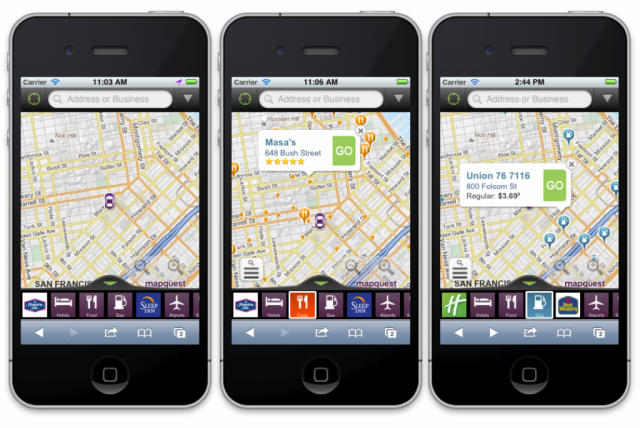
MapQuest has unveiled its new mobile strategy today by releasing not two separate apps for iPhone and Android but a web app that is compatible with both. In the browser.
The project was unveiled last year, but MapQuest hopes that this endeavour will boost its cross-platform usability by being out-of-the-box compatible with a number of different ecosystems, without the cost and time associated with different development teams and coding languages. More platforms are expected to be added soon.
Developed with HTML5 and Javascript, the new website is available at www.mapquest.com inside your mobile browser, and provides many of the same functionality as your native Google Maps. The app incorporates a dynamic menu that scrolls horizontally bringing one-touch access to landmarks such as gas stations, post boxes, schools, hospitals and restaurants. There seem to be a number of built-in sponsorships, too; my local Hampton Inn was displayed among the more generic boxes in the menu.
There are driving and walking directions, conveyed in an attractive and smooth interface that feels as native as HTML5 has ever been. Graphics and animation are good, but you still get the feeling you are sitting in a browser. The advantage is that the layout is the same whether you are on iPhone or Android.
The service is free, with built-in ads, and if it seems like your cup of tea, check it out.
Source: MapQuest blog
Via: Phonescoop

Because a web app with advertising is just as good as a built in app without advertising.
Like or Dislike:
16
1
How on earth is mapquest still alive. Google maps and Bing maps are much much better.
Like or Dislike:
21
3
I really tought MapQuest had died. That’s one name I had not heard for years.
Like or Dislike:
9
0
I just tried it out on my Galaxy Nexus and what a disaster. Choppy and couldn’t recognize “CN Tower” as a destination considering that it knew where I was at the time; North Toronto. No thanks. I’ll stick with the infinitely better Google Maps.
Like or Dislike:
7
0
yeah I don’t think so. I tried to take a look and see what this is all about and with an iphone 4 on 3g it was so slow I had to close it.
I think I will stick with google maps the market leader for a reason.
Like or Dislike:
6
0
Why are they wasting their resources? Why would anyone skip out on their native maps app, with turn by turn navigation and offline caching for a web based one that requires the internet all the time?
Like or Dislike:
4
0
Shitty maps aside… I like the idea of web-apps.
Like or Dislike:
2
2
Too slow and no pinch to zoom. Is this the best HTML5 can do? If so, fail.
Like or Dislike:
4
2
oh map quest. Haven’t heard that name in ages.
Like or Dislike:
3
0
Mapquest is more popular with the older crowd. It focuses more on the text direction rather than map, hence the popularity with older people
Like or Dislike:
2
1
Actually I live in a small town in BC Canada and use all the Android apps off the market plus what came stock on my Verizon D2G and all of them except for Mapquest have a section of streets in my town screwed up. This leads me to believe that Mapquest has a independent database from everyone else or has done a much better verification process of what really exists in the real world, so kudos to them and best of luck with the new concept. If I had to trust my life with a map app it would be Mapquest no ifs or butts.
Like or Dislike:
1
0
Tried it on a 4S.
First time: Crashed immediately after entering the url.
Second time: Crashed after loading the main page.
Third time: No thanks, I’ll just stick with Maps
Like or Dislike:
0
0
i’ve only use mapquest to print driving directions for a long roadtrip (in case my phone or GPS let’s me down)
Like or Dislike:
0
0
I tried it on my 9900 BlackBerry and it workded fine. Pinch to zoom works and turn by turn directions were there. It could zoom in much closer for my liking but for a perfectly free app it’s better than nothing and I like alternatives for when something else isn’t working.
For those that found it not to work, it may be your device’s implementation of HTML5 that is the problem. BlackBerry OS7 does that as good as any thus far.
Like or Dislike:
0
0
Definitely going to pass on this POS. ALWAYS recommends US locations, no Canadian landmarks at all. Scrolling is so choppy, like an iPhone 3G on iOS 4.x. Also, what the hell would I need to navigate to “Use Currently Location” as my end point? I’M ALREADY THERE!
Like or Dislike:
0
0
I have used mapquest iPhone app for some time, i like how they implemented places in it.
They should have invested in better servers and speed… thing site is slow.
pinch to zoom is too slow.
and worst of all… I dont want to see BANNER ADS that reduce the map size when I am navigating and driving.
Like or Dislike:
0
0
Pros:
Runs fine on my Archos Tablet. It showed my street correctly. Google Maps shows it wrong.
Cons:
I asked for directions and what it gave was not the best route. Can’t zoom in close enough in satalite view.
Like or Dislike:
0
0
